THE RULES ARE SIMPLE. THE ROUTE ISN’T.
Number Eater.
Think ahead.
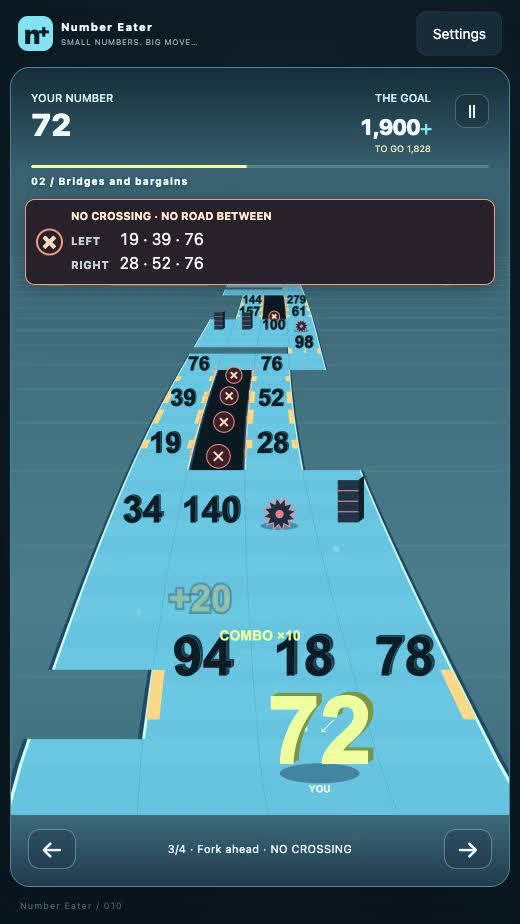
Number Eater is a free browser number runner for mobile and desktop. Eat numbers smaller than or equal to yours to add them to your total, avoid larger numbers and hazards, and reach the finish with the required value.
Play Number EaterFree to play · No download or signup
Make every number count
Eat and grow
If you are 5, you can eat another 5 to become 10. A larger number ends the run.
Read the road
Compare all three rows at each fork. There is no road between the two bridges: wait until they rejoin before crossing.
Keep your target in sight
Saws halve your number. Walls block the way. Green launch pads carry you over gaps; jumping does not let you cross the sides of a bridge.
Drag left or right on mobile. On desktop, use the left/right arrow keys or A/D. The on-screen arrow buttons work too. Press P or Esc to pause, or use the pause button.
One warm-up. Five expert tracks.
The target is fixed for each track. Starting or restarting generates fresh numbers and road layouts. From track 2, every key pickup matters: reaching the finish alone is not enough.
| Track | Start | Target |
|---|---|---|
| 01Small beginnings | 2 | 300 |
| 02Bridges and bargains | 5 | 1,900 |
| 03Leap of faith | 10 | 4,800 |
| 04Serpentine | 20 | 11,600 |
| 05Island hopper | 50 | 27,800 |
| 06Summit sprint | 100 | 55,600 |
Questions before your next run
Do I need to download, sign up, or pay?
The current public browser version is free to play, with no download or signup required. Commercial ads and payments are not connected.
Which numbers can I eat?
Eat numbers smaller than or equal to yours to add them to your total. For example, eating 5 when you are 5 makes 10. Avoid larger numbers.
Why can I lose at the finish?
Your number must meet the track’s target when you reach the finish. Tracks 2–6 require the right bridges and every key pickup. Missing a pickup, choosing the wrong bridge, or hitting a saw leaves you short unless you use a revive to rewind and correct the mistake.
Does restarting use the same map?
Starting or restarting generates new numbers and a new road layout for the selected track. Its target stays the same. Resuming, changing language, and reviving keep the current map.
How is reviving different from restarting?
You can revive at most once per run for free. On track 1, a collision or fall allows a revive with two seconds of protection and nearby hazards cleared. Finishing below the target does not. On tracks 2–6, reviving restores a checkpoint from which the goal is still reachable, sometimes at the start, including its number and map state. It gives no shield and clears no extra obstacles. Restarting generates a new map.
How do I control the game?
Drag left or right on mobile, use left/right arrow keys or A/D on desktop, or tap the on-screen arrow buttons. Choose a side before entering a fork: wait for the two bridges to rejoin before crossing.
Does the game save progress?
When browser storage is available, the game saves unlocked tracks, completion status, your highest number, and settings. An unfinished run is not saved across a page reload. Saves stay in this browser and do not sync to the cloud or automatically transfer to another browser, device, or domain. Clearing browser storage removes them.
Was the game made with AI?
Number Eater was created by tianming with AI coding assistance. Gameplay rules, direction and iterations are decided by the creator.
Made by tianming
A small game about quick comparisons and careful choices. Created with AI coding assistance; gameplay rules and iterations directed by tianming.
The game remembers a language you choose. Otherwise, it uses Chinese for China regions (including Hong Kong, Macao and Taiwan), and English elsewhere or when the region is unknown. Reading this guide does not change that preference.
Rules checked against the current browser version on 3 October 2026.